Thanks for visiting my blog. I'm try to make poll about platform of gadget that blogger used it. I'm very grateful if visitors this blog for taking the time to conduct a poll on the browser used. For information this is an independent poll that I used for looking what most used platform of gadget right now. Thanks for your time if you want to do this.
READ MORE - What platform of your gadget


Thursday, December 16, 2010

Friday, June 11, 2010
Alice in Wonderland

Alice, an unpretentious and individual 19-year-old, is betrothed to a dunce of an English nobleman. At her engagement party, she escapes the crowd to consider whether to go through with the marriage and falls down a hole in the garden after spotting an unusual rabbit. Arriving in a strange and surreal place called "Underland," she finds herself in a world that resembles the nightmares she had as a child, filled with talking animals, villainous queens and knights, and frumious bandersnatches. Alice realizes that she is there for a reason--to conquer the horrific Jabberwocky and restore the rightful queen to her throne. (imdb)
Cast:
Mia Wasikowska ... Alice
Johnny Depp ... Mad Hatter
Helena Bonham Carter ... Red Queen
Anne Hathaway ... White Queen
Crispin Glover ... Stayne
Matt Lucas ... Tweedledee / Tweedledum
Director ... Tim Burton
Download movie quality BRRip 720p
Subtitle:
Indonesia
English
Friday, June 4, 2010
The Bounty Hunter
Milo Boyd, a down-on-his-luck bounty hunter, gets his dream job when he is assigned to track down his bail-jumping ex-wife, reporter Nicole Hurly. He thinks all that's ahead is an easy payday, but when Nicole gives him the slip so she can chase a lead on a murder cover-up, Milo realizes that nothing ever goes simply with him and Nicole. The exes continually one-up each other - until they find themselves on the run for their lives. They thought their promise to love, honor and obey was tough - staying alive is going to be a whole lot tougher. Written by Sony Pictures ~ imdb.com

Cast:
Jennifer Aniston... Nicole Hurley
Gerard Butler ... Milo Boyd
Gio Perez ... Uncle Sam
Joel Garland ... Dwight (as Joel Marsh Garland)
Jason Kolotouros... Gelman
Matt Malloy ... Gary
Director ... Andy Tennant
Writer ... Sarah Thorp
Produced ... Neal H. Moritz
Genre : Action | Comedy | Crime | Romance
Movie trailer:
Download movie R5 quality:
Part 1, Part 2, Part 3, Part 4, Part 5
Subtitle:
English
READ MORE - The Bounty Hunter
Cast:
Jennifer Aniston... Nicole Hurley
Gerard Butler ... Milo Boyd
Gio Perez ... Uncle Sam
Joel Garland ... Dwight (as Joel Marsh Garland)
Jason Kolotouros... Gelman
Matt Malloy ... Gary
Director ... Andy Tennant
Writer ... Sarah Thorp
Produced ... Neal H. Moritz
Genre : Action | Comedy | Crime | Romance
Movie trailer:
Download movie R5 quality:
Part 1, Part 2, Part 3, Part 4, Part 5
Subtitle:
English
Monday, May 10, 2010
From Paris With Love (2010)

A personal aide to U.S. Ambassador in France, James Reece (Jonathan Rhys Meyers) has an enviable life in Paris and a beautiful French girlfriend, but his real passion is his side job as a low-level operative for the CIA. All James wants is to become a bona fide agent and see some real action. So when he's offered his first senior-level assignment, he can't believe his good luck until he meets his new partner, special agent Charlie Wax (John Travolta) - a trigger-happy, wisecracking, loose cannon who's been sent to Paris to stop a terrorist attack. Wax leads James on a white-knuckle shooting spree through the Parisian underworld that has James praying for his desk job. But when James discovers he's a target of the same crime ring they're trying to bust, he realizes there's no turning back...and that Wax himself might be his only hope for making it through the next forty-eight hours alive. (IMDB)
Cast:
John Travolta ... Charlie Wax
Jonathan Rhys Meyers ... James Reece
Kasia Smutniak ... Caroline
Richard Durden ... Ambassador Bennington
Yin Bing ... M. Wong
Amber Rose Revah ... Nichole
Director ... Pierre Morel
Writers ... Adi Hasak (screenplay)
Luc Besson (story)
Info: http://www.imdb.com/title/tt1179034/
Trailer:
Download movie:
Part 1, Part 2, Part 3, Part 4
Alternate download:
Mirror
Tuesday, March 16, 2010
Survey about what browser do you used
Thanks for visiting my blog. I'm try to make poll about browser that blogger used for surfing, blogging or etc. I'm very grateful if visitors this blog for taking the time to conduct a poll on the browser used. For information this is an independent poll that I used for looking what best browser right now. Thanks for your time if you want to do this.
READ MORE - Survey about what browser do you used
Photo Zoom at Facebook with Chrome Extension
You have account at Facebook and want to view photo of your friend with large photo and using Google Chrome browser, right now there is an extension for Chrome to zoom photo without clicking through to the entire album. It call Facebook Photo Zoom and claim the best photo zoomer around.
Facebook Photo Zoom is a simple, light-weight extension that integrates directly into Facebook so you can see the larger images of photo albums, profile photos and more whenever you hover over a zoomable image!
Screenshot of Facebook Photo Zoom:


You can install this Chrome extension here or go to https://chrome.google.com/extensions.
Thanks to regis.gaughan for this great Chrome Extension.
READ MORE - Photo Zoom at Facebook with Chrome Extension
Facebook Photo Zoom is a simple, light-weight extension that integrates directly into Facebook so you can see the larger images of photo albums, profile photos and more whenever you hover over a zoomable image!
Screenshot of Facebook Photo Zoom:
You can install this Chrome extension here or go to https://chrome.google.com/extensions.
Thanks to regis.gaughan for this great Chrome Extension.
Thursday, February 11, 2010
Google Wave ~ Tool From Google

Google Wave is an online tool for real-time communication and collaboration. A wave can be both a conversation and a document where people can discuss and work together using richly formatted text, photos, videos, maps, and more. Also can reply anywhere in the message, edit the content and add participants at any point in the process.
Watch below this video from Google Wave Developer:
This is some videos about Google Wave:
I've been invited and using Google Wave. If you want Google wave, you can post a comment below with your name and your email address (gmail only). I'm only 6 left invitations.
If you want to know more about Google Wave, you can go to Google Wave Blog or Google Wave website
Google Buzz
Google introducing about their new application. This application call Google Buzz, the new way to start conversation about the things you find interesting. It's like social networks such as Facebook and Twitter and connect with it from Buzz with Gmail. It's integrated with Gmail and others Google products.
Goggle says there is a five key elements about Google Buzz:
1. Auto following
2. Rich, Fast Sharing experience integrates photos, videos and links
3. Support for public and private sharing
4. In-box integration
5. Just the good stuff
Watch this video below to know more about Google Buzz:
Google Buzz also available for your phone mobile, this much more than just a small screen version of the desktop experience. It claim can be sharing location, posts tagged with geographical information have an extra dimension of context.
Watch video below about Google Buzz on Mobile:
Below this, video about launching Google Buzz on February 10, 2010.
Source:
1. Google blog
2. Webpronews
READ MORE - Google Buzz
Goggle says there is a five key elements about Google Buzz:
1. Auto following
2. Rich, Fast Sharing experience integrates photos, videos and links
3. Support for public and private sharing
4. In-box integration
5. Just the good stuff
Watch this video below to know more about Google Buzz:
Google Buzz also available for your phone mobile, this much more than just a small screen version of the desktop experience. It claim can be sharing location, posts tagged with geographical information have an extra dimension of context.
Watch video below about Google Buzz on Mobile:
Below this, video about launching Google Buzz on February 10, 2010.
Source:
1. Google blog
2. Webpronews
Friday, January 8, 2010
More about Google Chrome
Google Chrome is a web browser made by engineers Google with open source program. This is fast and also free web browser. Right now Chrome was released version 4.0 beta version. This beta version can synchronize bookmark with multiple computers you used. Check out this video about feature version 4.0 beta.
How about user who using Mac or Linux, can they used this great web browser? The answer is YES. Watch this video to know more or you can go to Google Chrome Blog.
Below this video from the development team and the idea of the features Google Chrome.
After watch video about Google Chrome and want to try it, you can download at Google Chrome website. There is one of several good Chrome Extension for blogger, it call BlogThis! Chrome Extension. For detailed about this extension you can read BlogThis! Chrome Extension at my last post.
Source
READ MORE - More about Google Chrome
How about user who using Mac or Linux, can they used this great web browser? The answer is YES. Watch this video to know more or you can go to Google Chrome Blog.
Below this video from the development team and the idea of the features Google Chrome.
After watch video about Google Chrome and want to try it, you can download at Google Chrome website. There is one of several good Chrome Extension for blogger, it call BlogThis! Chrome Extension. For detailed about this extension you can read BlogThis! Chrome Extension at my last post.
Source
Finaly, BlackPulsy blog got first PageRank
Today BlackPulsy blog got present from Google, this blog now have
 since created. I would thanks to Bloggers who visiting this blog, gave a comment or even being follower at Google Friends Connect.
You want check your blog PageRank with this tool below to check it.
If any question about my blog do not hesitate to contact me or leave comment in this post below.
READ MORE - Finaly, BlackPulsy blog got first PageRank
since created. I would thanks to Bloggers who visiting this blog, gave a comment or even being follower at Google Friends Connect.You want check your blog PageRank with this tool below to check it.
| Check Page Rank of any web site pages instantly: |
This free page rank checking tool is powered by Page Rank Checker service |
If any question about my blog do not hesitate to contact me or leave comment in this post below.
Saturday, January 2, 2010
Resize Photo with PIXresizer
If you take photo with your digital camera and want to share with friends using an email, post to blog or even upload to social networks like Facebook. The file is very big to upload and taking more time to do it. I found great software to do this, it's call PIXresizer. This software is a photo resizing program to easily reduced file sizes and size image without loosing resolution of image or photo.
This is free software and very powerful. Why, because original image or photo are not altered at all. You can resizing with different methods to choose from and can automatically recognize image sizes to calculate the best fit. In addition, it can convert between image formats (JPEG, GIF, BMP, PNG and TIFF), rotate images, convert to grayscale and resize multiple images in batch mode.


The features about PIXresize:
* Simple Four-Step Workflow
* Easy 'Apply recommended' option to make it even more user friendly
* Works with single files as well as with multiple files all at once
* Option to convert between graphics formats (.bmp, .gif, .jpg, .png, and .tif)
* Can be used to create thumbnails (takes one move on a slider)
* Smart Ratio Calculation (image proportions can be overruled by the user)
* EXIF support, JPEG compression, TIFF compression, DPI settings
* Runs on Windows 98/ME/NT4/2000/2003/XP/Vista
Download PIXresizer.zip
READ MORE - Resize Photo with PIXresizer
This is free software and very powerful. Why, because original image or photo are not altered at all. You can resizing with different methods to choose from and can automatically recognize image sizes to calculate the best fit. In addition, it can convert between image formats (JPEG, GIF, BMP, PNG and TIFF), rotate images, convert to grayscale and resize multiple images in batch mode.


* Simple Four-Step Workflow
* Easy 'Apply recommended' option to make it even more user friendly
* Works with single files as well as with multiple files all at once
* Option to convert between graphics formats (.bmp, .gif, .jpg, .png, and .tif)
* Can be used to create thumbnails (takes one move on a slider)
* Smart Ratio Calculation (image proportions can be overruled by the user)
* EXIF support, JPEG compression, TIFF compression, DPI settings
* Runs on Windows 98/ME/NT4/2000/2003/XP/Vista
Download PIXresizer.zip
Wednesday, December 30, 2009
Journey to Kuningan - West Java with Black Pulsy
.jpg) December 24, 2009 is biggest event for me. This my first trip to Kuningan West Java using my Black Pulsy motorcycle who companies with my 2 friends riding motorcycle too. Almost 800 km round trip and 20 hours riding this motorcycle. Start from Jakarta at 22.00 WIB through Jonggol - Cianjur - Bandung - Nagrek and take a rest at Jahim village to waiting sunrise through Ciremai mountain and Kuningan City from top of hill.
December 24, 2009 is biggest event for me. This my first trip to Kuningan West Java using my Black Pulsy motorcycle who companies with my 2 friends riding motorcycle too. Almost 800 km round trip and 20 hours riding this motorcycle. Start from Jakarta at 22.00 WIB through Jonggol - Cianjur - Bandung - Nagrek and take a rest at Jahim village to waiting sunrise through Ciremai mountain and Kuningan City from top of hill.I saw the most amazing sights from the top of this hill. The weather of Jahim hill so clear but I can not saw Ciremai mountain because black cloud blocked. After the sun began to emerge, we continue again the journey to Kuningan City.
At Kuningan City we go to Sangkanhurip and try hot pool with my friends with condition heavy rain. At December 26, 2009 we prepare to leave Kuningan City to back to home Jakarta. Before we leave, we stop by to saw Museum Linggarjati. This place is used to negotiations between Indonesia and the Netherlands. If you want to know more about Museum Linggarjati, you can search with Google or you can go to website of Kuningan
And this is pictures of my journey to Kuningan City. I hope I can go to this city again, because still lot of place like: Balong Keramat Darmaloka, Curug Sidomba, Gua Maria Fatimah Sawer Rahmat.
Tuesday, December 29, 2009
Top 10 Box Office Movies 2009
The end of the year 2009, here I am trying to make about the 10 best movies and earn the most from early 2009 until the end of the year. This news I adopt from Yahoo! Movies, In 2009, giant robots, teen wizards and high-flying houses dominated the box office, with moviegoers flocking to theaters to the tune of over $10 billion in ticket sales. Here are the top ten highest grossing films at the domestic box office this year.
10. THE BLIND SIDE
Total Gross: $184,387,000
Boasting no explosions, CGI robots or vampires, but propelled by good word-of-mouth, this inspirational drama climbed its way into the number ten spot over the Christmas holiday weekend.
Starring: Sandra Bullock, Tim McGraw, Quinton Aaron, Lily Collins, Ray McKinnon
Directed by: John Lee Hancock
Produced by: Molly Smith, Erwin Stoff, Timothy M. Bourne
9. Ice Age: Dawn of the Dinosaurs
Total Gross: $196,573,705
Not only did the prehistoric critter crew return for their biggest box office outing yet, the third 'Ice Age' adventure conquered the number 2 spot at the worldwide box office with a massive $883.7 million.
Starring: Ray Romano, John Leguizamo, Denis Leary, Queen Latifah, Simon Pegg
Directed by: Carlos Saldanha, Michael Thurmeier
Produced by: Chris Wedge, Lori Forte, John Donkin
8. Monsters Vs. Aliens
Total Gross: $198,351,526
In a crowded field of animated titles this year, this monstrous adventure towered over the pack, stepping into the top ten with one of the biggest spring opening weekends ever.
Starring: Reese Witherspoon, Hugh Laurie, Seth Rogen, Will Arnett, Rainn Wilson, Kiefer Sutherland and Stephen Colbert.
Directed by: Rob Letterman, Conrad Vernon
Produced by: Lisa Stewart, Jill Hopper, Latifa Ouaou
7. AVATAR
Total Gross: $212,268,000
Arguably one of the most anticipated movies of the decade, director James Cameron's visionary sci-fi epic leaped into the top ten during the final weeks of the year.
Another link
6. Star Trek
Total Gross: $257,730,019
Live long and propser! Director J.J. Abrams' bold re-imagining of the classic sci-fi franchise proved popular with both old and new fans alike, easily grossing more than any previous Star Trek movie.
Starring: Leonard Nimoy, Zachary Quinto, Anton Yelchin, Zoe Saldana, Chris Pine
Directed by: J.J. Abrams
Produced by: Roberto Orci, Alex Kurtzman, Damon Lindelof
5. The Hangover
Total Gross: $277,322,503
Easily the surprise breakout hit of the summer, this tawdry tale of the ultimate Vegas bachelor party gone wrong defied all expectations to become the number one R-rated comedy of all time.
Starring: Bradley Cooper, Ed Helms, Zach Galifianakis, Heather Graham, Justin Bartha
Directed by: Todd Phillips
Produced by: Scott Budnick, Thomas Tull, Jon Jashni
4. The Twilight Saga: New Moon
Total Gross: $280,924,000
Hot off the success of 2008's 'Twilight,' the second installment of Stephanie Meyers' supernatural romance saga wolfed down a record-breaking $72,703,754 for the highest opening day earnings of all time.
Starring: Kristen Stewart, Robert Pattinson, Taylor Lautner, Ashley Greene, Michael Sheen, Dakota Fanning and Nikki Reed
Directed by: Chris Weitz
3. UP
Total Gross: $293,004,164
The animation wizards at Pixar did it again, soaring to number three, nabbing the studio its second highest grossing movie ever (behind Finding Nemo), and becoming the highest grossing 3D movie of all time.
Starring: Edward Asner, Jordan Nagai, Christopher Plummer, Delroy Lindo and John Ratzenberger
Directed by: Pete Docter, Bob Peterson
Produced by: Jonas Rivera
2. HARRY POTTER AND THE HALF-BLOOD PRINCE
Total Gross: $301,959,197
The popular teen wizard returned for his sixth year at Hogwarts to grab second place, but cast a powerful spell on the worldwide box office, taking the top spot with a magical $929.4 million.
Starring: Daniel Radcliffe, Emma Watson, Rupert Grint, Tom Felton, Helena Bonham Carter
Directed by: David Yates
Produced by: Lionel Wigram, David Heyman, David Barron
1. TRANSFORMERS: REVENGE OF THE FALLEN
Total Gross: $402,111,870
Autobots battled Decepticons to the top of the box office, not only becoming the top earning movie of the year, but also firmly planting itself at number 9 among the top ten highest domestic grossing films of all time.
Starring: Shia LaBeouf, Megan Fox, Josh Duhamel, Tyrese Gibson, John Turturro, Isabel Lucas and Ramon Rodriguez
Directed by: Michael Bay
READ MORE - Top 10 Box Office Movies 2009
10. THE BLIND SIDE
Total Gross: $184,387,000
Boasting no explosions, CGI robots or vampires, but propelled by good word-of-mouth, this inspirational drama climbed its way into the number ten spot over the Christmas holiday weekend.
Starring: Sandra Bullock, Tim McGraw, Quinton Aaron, Lily Collins, Ray McKinnon
Directed by: John Lee Hancock
Produced by: Molly Smith, Erwin Stoff, Timothy M. Bourne
9. Ice Age: Dawn of the Dinosaurs
Total Gross: $196,573,705
Not only did the prehistoric critter crew return for their biggest box office outing yet, the third 'Ice Age' adventure conquered the number 2 spot at the worldwide box office with a massive $883.7 million.
Starring: Ray Romano, John Leguizamo, Denis Leary, Queen Latifah, Simon Pegg
Directed by: Carlos Saldanha, Michael Thurmeier
Produced by: Chris Wedge, Lori Forte, John Donkin
8. Monsters Vs. Aliens
Total Gross: $198,351,526
In a crowded field of animated titles this year, this monstrous adventure towered over the pack, stepping into the top ten with one of the biggest spring opening weekends ever.
Starring: Reese Witherspoon, Hugh Laurie, Seth Rogen, Will Arnett, Rainn Wilson, Kiefer Sutherland and Stephen Colbert.
Directed by: Rob Letterman, Conrad Vernon
Produced by: Lisa Stewart, Jill Hopper, Latifa Ouaou
7. AVATAR
Total Gross: $212,268,000
Arguably one of the most anticipated movies of the decade, director James Cameron's visionary sci-fi epic leaped into the top ten during the final weeks of the year.
Another link
6. Star Trek
Total Gross: $257,730,019
Live long and propser! Director J.J. Abrams' bold re-imagining of the classic sci-fi franchise proved popular with both old and new fans alike, easily grossing more than any previous Star Trek movie.
Starring: Leonard Nimoy, Zachary Quinto, Anton Yelchin, Zoe Saldana, Chris Pine
Directed by: J.J. Abrams
Produced by: Roberto Orci, Alex Kurtzman, Damon Lindelof
5. The Hangover
Total Gross: $277,322,503
Easily the surprise breakout hit of the summer, this tawdry tale of the ultimate Vegas bachelor party gone wrong defied all expectations to become the number one R-rated comedy of all time.
Starring: Bradley Cooper, Ed Helms, Zach Galifianakis, Heather Graham, Justin Bartha
Directed by: Todd Phillips
Produced by: Scott Budnick, Thomas Tull, Jon Jashni
4. The Twilight Saga: New Moon
Total Gross: $280,924,000
Hot off the success of 2008's 'Twilight,' the second installment of Stephanie Meyers' supernatural romance saga wolfed down a record-breaking $72,703,754 for the highest opening day earnings of all time.
Starring: Kristen Stewart, Robert Pattinson, Taylor Lautner, Ashley Greene, Michael Sheen, Dakota Fanning and Nikki Reed
Directed by: Chris Weitz
3. UP
Total Gross: $293,004,164
The animation wizards at Pixar did it again, soaring to number three, nabbing the studio its second highest grossing movie ever (behind Finding Nemo), and becoming the highest grossing 3D movie of all time.
Starring: Edward Asner, Jordan Nagai, Christopher Plummer, Delroy Lindo and John Ratzenberger
Directed by: Pete Docter, Bob Peterson
Produced by: Jonas Rivera
2. HARRY POTTER AND THE HALF-BLOOD PRINCE
Total Gross: $301,959,197
The popular teen wizard returned for his sixth year at Hogwarts to grab second place, but cast a powerful spell on the worldwide box office, taking the top spot with a magical $929.4 million.
Starring: Daniel Radcliffe, Emma Watson, Rupert Grint, Tom Felton, Helena Bonham Carter
Directed by: David Yates
Produced by: Lionel Wigram, David Heyman, David Barron
1. TRANSFORMERS: REVENGE OF THE FALLEN
Total Gross: $402,111,870
Autobots battled Decepticons to the top of the box office, not only becoming the top earning movie of the year, but also firmly planting itself at number 9 among the top ten highest domestic grossing films of all time.
Starring: Shia LaBeouf, Megan Fox, Josh Duhamel, Tyrese Gibson, John Turturro, Isabel Lucas and Ramon Rodriguez
Directed by: Michael Bay
Monday, December 28, 2009
Adding Signature to Blog Post

Do you want to show your customized signature below your blogger posts? All your blog posts will carry your signature at the bottom area of your posts. You can add your signature in both text and image format, but since image format gives you a lots of options like custom text, custom formatting etc, I'll try to guide you with adding a custom signature in image format.
First of all make a custom signature. If you familiar with image software like Adobe Photoshop, CorelDraw, etc. You can making signature image with one of those software, but if you want making on net you can search at Google with keyword "Online signature". Once you are done with your signature, upload your signature to any image hosting site and get the link from there.
I assume you are done with your signature and ready with a link to it, now follow the below steps.
1. Log on to your blogger Dashboard.
2. Navigate to Layout >> Edit HTML
3. Expand your widgets by clicking on Expand Widget Templates
4. Search for the following code inside your HTML code
<p/><post.body><p/> |
|---|
5. Now add link of your image from image hosting below this code.
<p/><post.body><p/> |
|---|
6. Final code should like this :
<p/><post.body><p/><a img src='link YOUR-IMAGE-HOSTING'/></a> |
|---|
7. Click on Save Template to save the changes.
8. You are done.
Now you should see the image signature below your blogger blog posts. If you want to write your signature in text, simply replace the signature link with your name and you will be done.
If you have any question or even suggestion about this tutorial do not hesitate to leave a comment below this post.
Wednesday, December 23, 2009
Add AdSense Code in Blogger Post Body
Right now I want to share about add Adsense code in post body. As we know, blogger was integrated with Adsense to monetize your blog. You can add Adsense below on the post using Blogger feature. How to use it, just go to template of your blog and tab Layout and then Page Elements. You can see in you layout the headeng "Blog Posts". Click the "Edit" link at the bottom right corner. You will see this screen.

My assume that you have a Google AdSense account. If you don't, you can create one using the same login through your Google account. You will be assigned a Publisher identity number which shall appear in all your AdSense codes.
Tick the “Show Ads Between Posts.” You can select whether to show ads after every post or after several posts. In accordance with AdSense TOC, a maximum of 3 Ads will be displayed. Choose the ad format and color scheme. Save the changes and refresh your Blog to see the Ads.
Now, how to add Adsense code in post body. First you must log in to Google Adsense Account. Go to Adsense Setup -> Product and choose "AdSense for Content". And then select "Ad unit" and follow their instructions on picking the size of ad, color combination, and so on, right till the end when they automatically generate a HTML code for you. Copy this code and paste it into Microsoft Notepad.


You must converting some of the characters to character entities before you paste to template. Why, because this code will be convert by blogger and code what you got from Adsense account cannot show.
What code must be converting if want to paste to my template? You can changes several character like
< with <
> with >
" with "
And your final code should look something like this:
If you want to converting automatically, you can try to this site or this site.
After converting Adsense code, now I can show you to paste to blogger template. First you must login to your Dashboard. Go to Template -> Edit HTML and don't forget to click the box next to "Expand Widget Templates".

Block copy the entire HTML code for your site that you presently have and save it in a separate text file in MS Notepad. You can also click the "Download Template" link to backup the template. This is one of the two necessary steps whenever you want to change the template. The second step is to “Preview” the new changes, and save the changes only when you are satisfied. The backup you have saved in a text file will come in handy when you accidentally click to save the changes without previewing them. With a backup, you can easily restore the template to the prior state if need be.
Now search for post.body through your browser's search function (Ctrl+F for Firefox and IE). You should see these lines:-
If you want the AdSense ads to appear between the post title and post body, add the following code above the orange lines. If you want the AdSense ads to appear immediately after every individual post, add the following code below the orange lines. The code to add is:-
The AdSense Code is the one you have amended above in MS Notepad. Do NOT save the template, but click the Preview button to see if you like the placement of the AdSense ads.

If you want to change Adsense ads on the right site of the text, just change code like this:
Hopefully this posting helpful for all, more detailed about this you can go to this link below. Happy blogging.
Tips for New Bloggers: AdSense Code in Blogger Post Body


READ MORE - Add AdSense Code in Blogger Post Body

Tick the “Show Ads Between Posts.” You can select whether to show ads after every post or after several posts. In accordance with AdSense TOC, a maximum of 3 Ads will be displayed. Choose the ad format and color scheme. Save the changes and refresh your Blog to see the Ads.
Now, how to add Adsense code in post body. First you must log in to Google Adsense Account. Go to Adsense Setup -> Product and choose "AdSense for Content". And then select "Ad unit" and follow their instructions on picking the size of ad, color combination, and so on, right till the end when they automatically generate a HTML code for you. Copy this code and paste it into Microsoft Notepad.


What code must be converting if want to paste to my template? You can changes several character like
< with <
> with >
" with "
And your final code should look something like this:
<script type="text/javascript"><!-- google_ad_client = "pub-0000000000000000"; google_ad_width = 336; google_ad_height = 280; google_ad_format = "336x280_as&amp;quot;; google_ad_type = "text"; google_ad_channel = ""; google_color_border = "FFFFFF"; google_color_bg = "FFFFFF"; google_color_link = "000000"; google_color_text = "000000"; google_color_url = "000000"; //--></script> <script type="text/javascript" src="http://pagead2.googlesyndication.com/pagead/show_ads.js"> </script> |
|---|
If you want to converting automatically, you can try to this site or this site.
After converting Adsense code, now I can show you to paste to blogger template. First you must login to your Dashboard. Go to Template -> Edit HTML and don't forget to click the box next to "Expand Widget Templates".

Now search for post.body through your browser's search function (Ctrl+F for Firefox and IE). You should see these lines:-
<div class='post-body'> <p><data:post.body/></p> <div style='clear: both;'/> <!-- clear for photos floats --> </div> |
|---|
If you want the AdSense ads to appear between the post title and post body, add the following code above the orange lines. If you want the AdSense ads to appear immediately after every individual post, add the following code below the orange lines. The code to add is:-
<div style='float:left;'> AdSense Code </div> |
|---|
The AdSense Code is the one you have amended above in MS Notepad. Do NOT save the template, but click the Preview button to see if you like the placement of the AdSense ads.

If you want to change Adsense ads on the right site of the text, just change code like this:
<div class='post-header-line-1'/> <div style='float:right;'> AdSense Code </div> <div class='post-body'> <p><data:post.body/></p> <div style='clear: both;'/> <!-- clear for photos floats --> </div> |
|---|
Hopefully this posting helpful for all, more detailed about this you can go to this link below. Happy blogging.
Tips for New Bloggers: AdSense Code in Blogger Post Body
Tuesday, December 22, 2009
Blogger integrates with Amazon Associates

If you’re have sign in with Amazon Associates, now Blogger was integrates with Amazon. This news was publish at December 16, 2009 at Blogger Buzz. Besides Google Adsense for contextual advertising and feeds in Monetize setting you can setting Amazon Associates too.


To get started, click on the Monetize tab for your blog and click “Amazon Associates”. Walk through the setup wizard and add the Product Finder. For more detailed about this, you can read on Blogger Buzz or you go to Amazon.com site and Amazon Associates blog.
Blogger Buzz: Blogger integrates with Amazon Associates
Saturday, December 19, 2009
Avatar The Movie
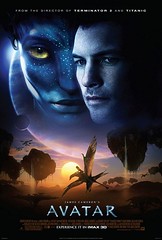
An awesome movie with combined real actors and actress with new stereoscopic 3D ~ Fusion Camera System Technology. This movie is not same as cartoon TV series Avatar - The Last Airbender. James Cameron (Director of AVATAR) claim this not an animation movie, he also pioneered a realistic 3D technology that requires the audience to wear special glasses. Take a look the story of AVATAR the movie.
Avatar takes us to a spectacular world beyond imagination, where a reluctant on an epic adventure, ultimately fighting to save the alien world has learned to call home. James Cameron, the Oscar-winning director of "Titanic" first conceived the film 15 years ago, when the means to realized his vision did not yet exist. Now, after four years of production, AVATAR, a live action film with a new generation of special effects, delivers a fully immersive cinematic experience of a new kind, where revolutionary technology invented to make the film, disappears into the emotion of the characters and the sweep of the story.
We enter the alien world through the eyes of Jake Sully (Sam Worthington), a former Marine confined to a wheelchair. But despite his broken body, Jake is still warrior at heart. He is recruited to travel light years to the human outpost on Pandora, where corporations are mining a rare mineral that is the key to solving Earth's energy crisis. Because the atmosphere of Pandora is toxic, they have created the Avatar Program, in which human "drivers" have their consciousness linked to an avatar, a remotely-controlled biological body that can survive in the lethal air. These avatars are genetically engineered hybrids of human DNA mixed with DNA from the natives of Pandora... The Na'vi.
Reborn in his avatar form, Jake can walk again. He is given a mission to infiltrate the Na'vi, who became a major obstacle to mining the precious ore. But beautiful Na'vi female, Neytiri (Zoe Saldana), saves Jake's life and this change everything. Jake is taken in by her clan and learns to became one of them, which involves many tests and adventures. As Jake's relationship with his reluctant teacher Neytiri deepens, he learn to respect the Na'vi way and finally takes his place among them. Soon he will face the ultimate test as he leads them in an epic battle that will decide nothing less than the fate of an entire world.
Cast:
Sam Worthington ... Jake Sully
Zoe Saldana ... Neytiri
Sigourney Weaver ... Dr. Grace Augustine
Stephen Lang ... Colonel Miles Quaritch
Michelle Rodriguez ... Trudy Chacon
Giovanni Ribisi ... Parker Selfridge
Joel David Moore ... Norm Spellman
CCH Pounder ... Moat
Wes Studi ... Eytukan
Laz Alonso ... Tsu'tey
Director by James Cameron
Soundtrack music composed by James Horner
Date released in cinemas December 18, 2009
Trailer movie:
Source: http://www.avatarmovie.com/
Friday, December 18, 2009
Tool for checking how fast your blog

While blogwalking, I found tool for check how fast your blog loading. Just remembering about Google Caffeine will launch after holiday. This tool I've got from RankQuest.com, you can check how fast your web page loads.
This tool which call Web Speed Report is very easy, just put on full link (ex: http://blackpulsy.blogspot.com) of your site to box then hit 'check speed'. Wait until the result appear, it takes time to load. The result of information contains size of your site, time to load with variable speed connection (28 Kbps, 56 Kbps, 64 Kbps, 128 Kbps, 256 Kbps).

How about speed of this blog? I've been try with this tool and this is capture result of this blog

And now how about speed of your site? Curious to try it?
On RankQuest website, there is another SEO tools very useful like:
1. Validation tools.
2. Content tools.
3. Meta tools.
4. Popularity tools.
5. Search engine tools.
6. SEM tools.
This tools very useful for me to build this blog. If you have any quetion or even share information about this post, you can put your comment below this post.
Google Caffeine and Site Speed
Referring to my last posting about Google Caffeine ~ New from Google. I've got a news from WebProNews.com, the reporter had interviewed and discussed with Matt Cuttls ~ Software Engineer Google Inc, about two key ingredients. The first ingredients is about Algorithm update (Caffeine) which was recently found to begin rolling out soon.
 The fact of the matter, as Matt himself says, is that it is only going live at one of Google’s data centers, and it is not even live yet, but will be before the holidays. That said, Caffeine will not roll out to the rest of Google’s data centers until after the holidays. He says that while Google could have rolled the update out faster, they didn’t want to upset webmasters by releasing it before the holidays. This is something that happened in the past when Google released its infamous Florida update before the holidays, causing rankings to drastically change. Cutts says not to panic.
Cutts also says that there might be an address set up soon where people can go and search, maybe not exclusively with Caffeine 100% of the time, but where queries will be more likely to hit the data center that’s hosting it.
The second things that Matt discussed is that of site speed. From the sound of it, speed is going to be a huge factor in SEO moving in to 2010. He says that a number of people within Google consider speed to be very important to the web, and they are considering if that should play a role in the rankings of websites in search results.
According to Cutts, speed hasn’t played a role in rankings in the past, but that may very well change. Watch the video for more details about Caffeine and Google’s resources for helping webmasters improve site speed.
See the video about this:
Consider if Page Speed is to Become a Ranking Factor
Bill Hartzer recently shared a few tips on the subject in an interview with WebProNews, you can see the video here.
Google also has its own tips. The company offered a few on site performance improvement using its Webmaster Tools. Webmaster Tools has a Site Performance feature, which shows you a performance overview graph. This looks at the aggregated speed numbers for your site, based on the pages that were most frequently accessed by visitors who use the Google Toolbar and have the PageRank feature activated.

Google recommends that you watch the load times over a short period of time to see what's stable, because you may see spikes here and there. If you consistently see high load times, that is probably representative of what most people see.

There is also a section that gives you Page Speed Suggestions. It gives you some example pages from your site and suggestions on how to optimize those specific pages. The suggestions are based on Google's Page Speed Firefox/Firebug plug-in.

Google give more information on each of these features here.
Sites aren't the only things Google places emphasis on speed with. Last week, Google launched a new extension for Chrome, which lets developers identify performance problems with their web apps too. The tool is called Speed Tracer, and it uses a "sluggishness graph" combined with other metrics to help users pinpoint the problems that are slowing their web apps down.
Are you ready for this methods about new algorithm upadate rangking to your site? Hopefully this post can provide some knowledge about Google Caffeine. If there are suggestions and comments we can share here.
Source:
~ www.webpronews.com - by Chris Crum
~ googlewebmastercentral.blogspot.com
READ MORE - Google Caffeine and Site Speed
 The fact of the matter, as Matt himself says, is that it is only going live at one of Google’s data centers, and it is not even live yet, but will be before the holidays. That said, Caffeine will not roll out to the rest of Google’s data centers until after the holidays. He says that while Google could have rolled the update out faster, they didn’t want to upset webmasters by releasing it before the holidays. This is something that happened in the past when Google released its infamous Florida update before the holidays, causing rankings to drastically change. Cutts says not to panic.
 Cutts also says that there might be an address set up soon where people can go and search, maybe not exclusively with Caffeine 100% of the time, but where queries will be more likely to hit the data center that’s hosting it.
The second things that Matt discussed is that of site speed. From the sound of it, speed is going to be a huge factor in SEO moving in to 2010. He says that a number of people within Google consider speed to be very important to the web, and they are considering if that should play a role in the rankings of websites in search results.
According to Cutts, speed hasn’t played a role in rankings in the past, but that may very well change. Watch the video for more details about Caffeine and Google’s resources for helping webmasters improve site speed.
See the video about this:

Consider if Page Speed is to Become a Ranking Factor
Bill Hartzer recently shared a few tips on the subject in an interview with WebProNews, you can see the video here.
Google also has its own tips. The company offered a few on site performance improvement using its Webmaster Tools. Webmaster Tools has a Site Performance feature, which shows you a performance overview graph. This looks at the aggregated speed numbers for your site, based on the pages that were most frequently accessed by visitors who use the Google Toolbar and have the PageRank feature activated.


Google give more information on each of these features here.
Sites aren't the only things Google places emphasis on speed with. Last week, Google launched a new extension for Chrome, which lets developers identify performance problems with their web apps too. The tool is called Speed Tracer, and it uses a "sluggishness graph" combined with other metrics to help users pinpoint the problems that are slowing their web apps down.
Are you ready for this methods about new algorithm upadate rangking to your site? Hopefully this post can provide some knowledge about Google Caffeine. If there are suggestions and comments we can share here.
Source:
~ www.webpronews.com - by Chris Crum
~ googlewebmastercentral.blogspot.com
Wednesday, December 16, 2009
You comment I follow - Get PR while comment
Almost all blog platforms by default are set up so that a “dead end” piece of code is inserted wherever there is a link in a comment, so that search engines will not “count” the link as they are crawling the internet. This was originally designed to help stop comment spam, but it doesn’t work. What it does is remove some of the incentive for your readers contribute to your site by commenting on your posts.
What can you do about it? Turn off “nofollow”. Show your commenters that you appreciate them. Spread the link love.
How? Depending on the blog platform you’re on, you can go to Randa Clay for how to turn of "nofollow" and get badge "You commnet I folow" to your blog.
READ MORE - You comment I follow - Get PR while comment
What can you do about it? Turn off “nofollow”. Show your commenters that you appreciate them. Spread the link love.
How? Depending on the blog platform you’re on, you can go to Randa Clay for how to turn of "nofollow" and get badge "You commnet I folow" to your blog.

(image from Randa Clay website)
Subscribe to:
Posts (Atom)


